
For South African preschools
Every child's day, shared with their family.
Little Moments is one app for parents, teachers, the principal and the office. Teachers share a child's day in under a minute, the office keeps track of fees, and notices reach the right families, without paper or WhatsApp groups.
A 30-minute walkthrough at your school or online. Start with one class for one term.
What changes at your school
“How was her day?” Parents get a few words at the gate, and parents in a lift club get nothing.
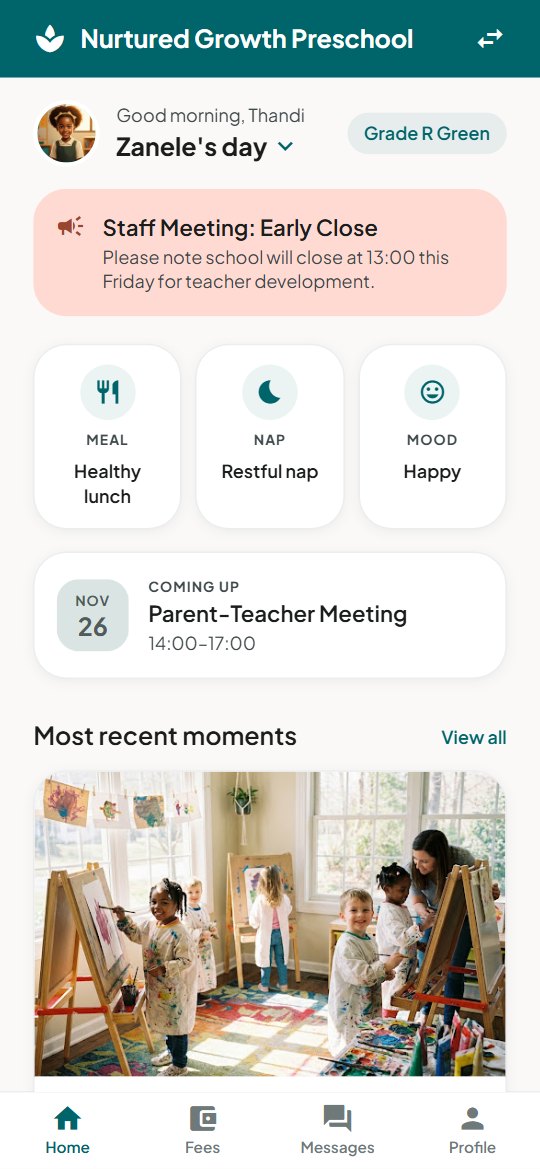
The teacher taps meal, nap and mood and adds a photo. The parent sees it at work.
Photos in group chats. Every child's photo goes to every family in the class group.
A photo goes only to that child's family, and only if the family has agreed.
Notices go missing. Letters stay in school bags and messages scroll away.
A notice goes to the whole school or one class, with the form attached, and stays in the app.
Chasing fees. Statements are typed up each month and bank lines matched to names.
Invoices are made each month. The office records each EFT or cash payment and sees who still owes.
One app, a view for each person
Everyone signs in with their own account and sees only what their role needs.
Teachers
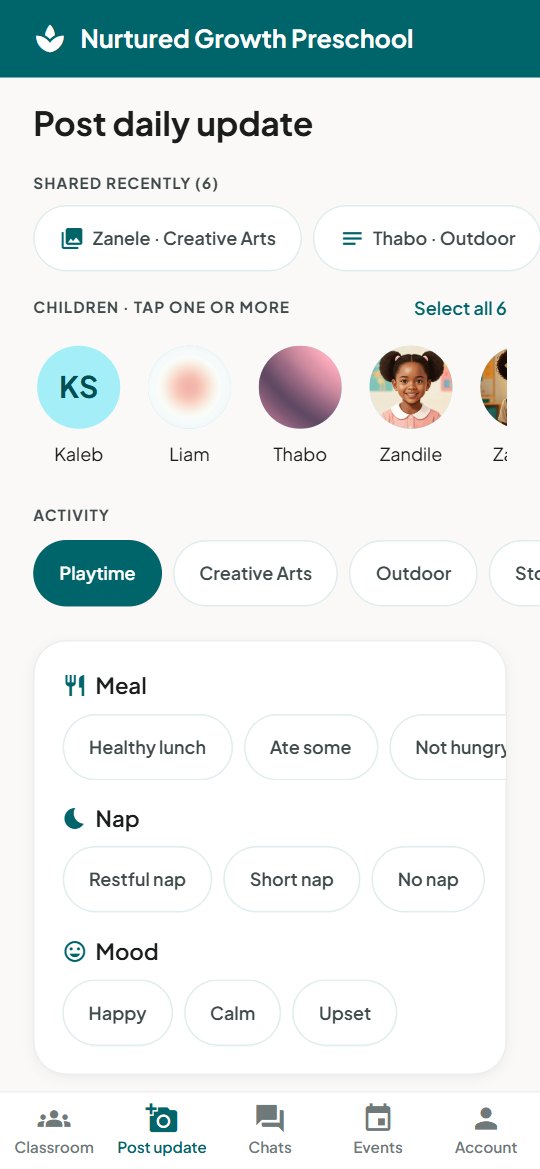
A child's day in under a minute
- Check children in and out, and see who still needs an update today.
- Pick the child, tap meal, nap and mood, add a note and photos.
- Answer parents in the app, not from your own phone number.
- On the phone, or on the classroom computer with the same login.
Parents
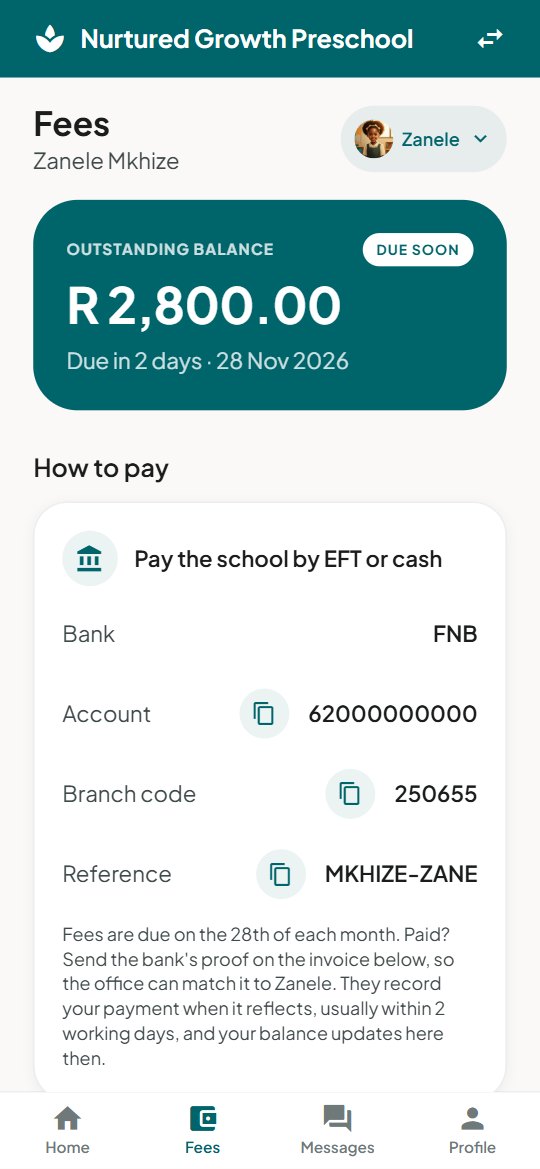
Their child's day, fees and notices in one place
- What their child ate, how they slept and their mood, with the teacher's note and photos.
- What is owed and when, every invoice, and the school's bank details with their reference.
- Chat with the class teacher, the school calendar, and a login for each parent or gogo.
- In the app on their phone, or on any computer with the same login.
Principal and office
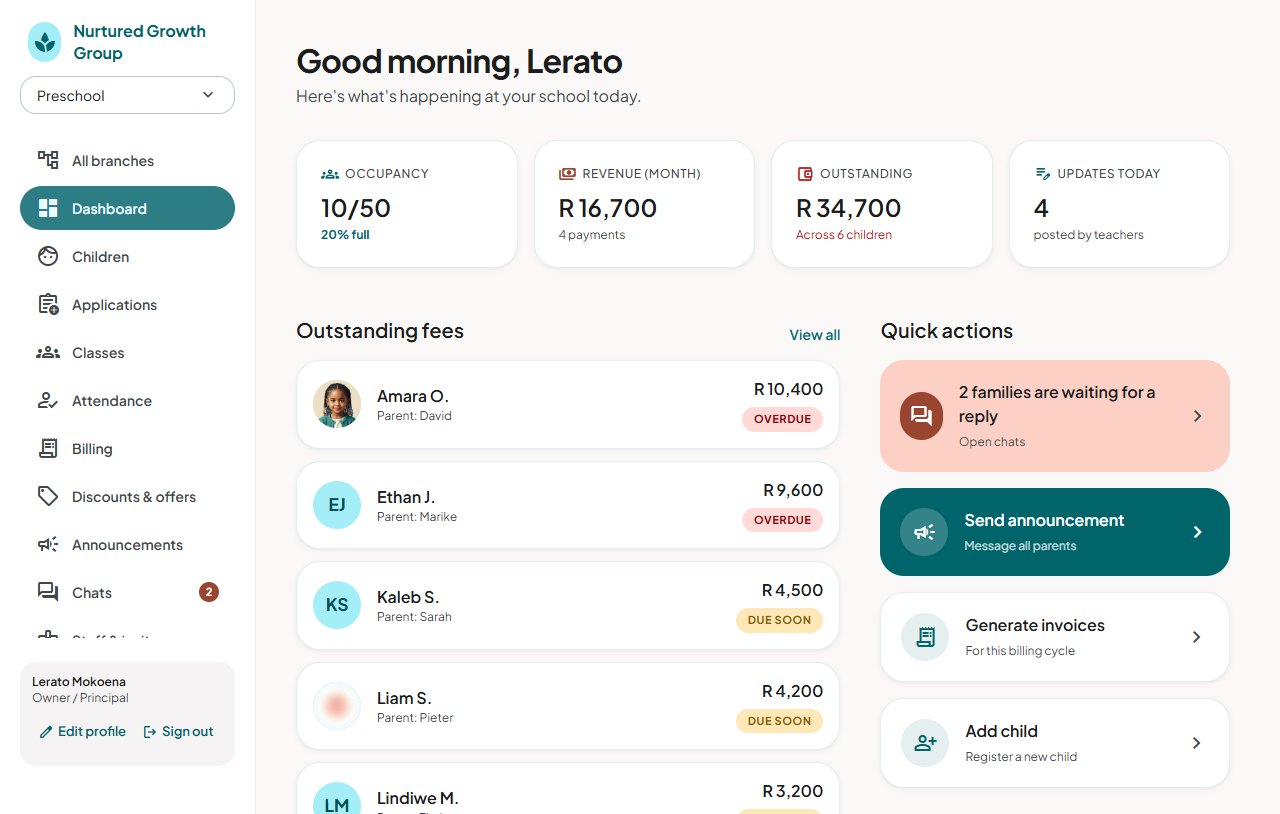
The whole school, on the computer or your phone
- Invoices each month, overdue fees and reminders, with payments recorded as they come in.
- Discounts for siblings or for paying a term upfront, applied to the right invoices.
- Children, classes, pickup lists and the daily register in one place.
- Notices and the calendar for the whole school or one class.
- Invite staff and families with a code. Nobody joins without one.
- An activity log of who changed what, and when.
Getting started
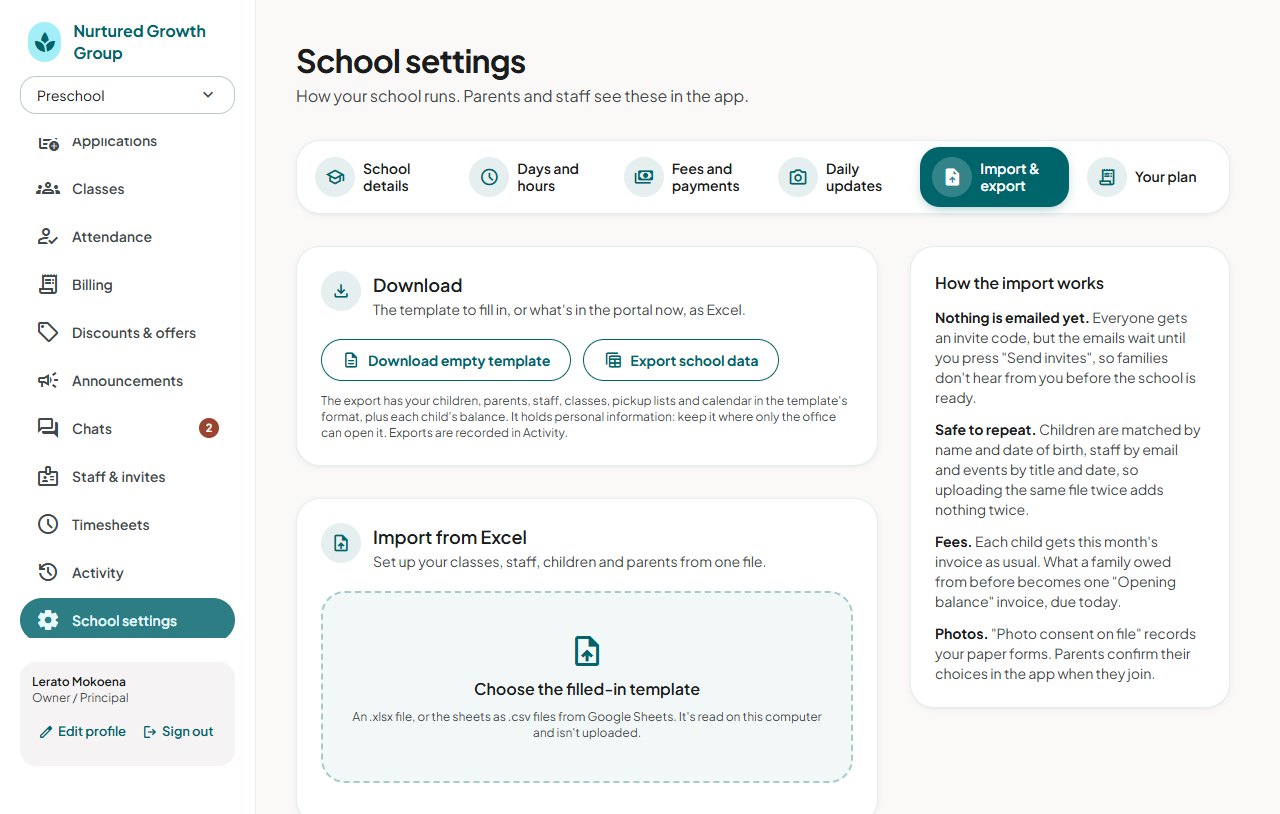
Bring your school in from one Excel file
- Download our template and fill in your classes, staff, children, parents, pickup lists and the term's calendar.
- What each family owed before you started comes in as an opening balance, next to this month's fees.
- The file is read on your computer and checked before anything is saved. Each mistake is listed by sheet, row and column.
- Invites wait until you're ready to send them, and a parent with two children gets one code for both.
- Imported the wrong file? Undo it, before families and teachers start using it.
- Export your children, parents, staff, classes, pickup lists, calendar and balances to Excel at any time.
Privacy and POPIA
Children's information, handled with care
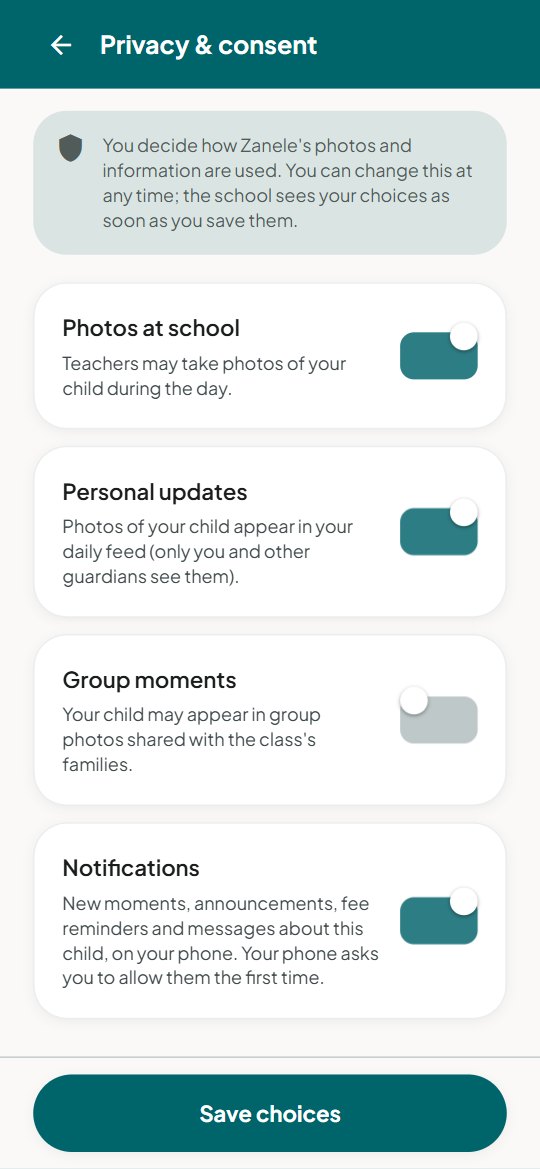
- Photos only with consent. A photo can be added to a child's update only if the family has agreed. The app blocks it otherwise.
- Parents see only their own child. No parent can see another family's child, updates or account.
- By invitation only. Nobody joins without a code from the school, and teachers don't see fees.
- A record of every change. Who enrolled a child, recorded a payment or changed a privacy choice, and when.
Built around the Protection of Personal Information Act. Your school stays responsible for its families' information, and we sign an operator agreement with you before any real data is loaded. Children's records and photos are kept in Google's Johannesburg data centre; signing in is handled by Google in the United States. Read our privacy notice.
Start small, with one class
Try it with one class for one term before deciding anything. We set it up and support you throughout.
- Week 1Walkthrough and set-up. A 30-minute demonstration. We set up your school with you, and the pilot class, its families and each child's fee come in from one Excel file.
- Week 2The teacher and parents join. Parents get a code, install the app and make their privacy choices.
- Weeks 3–8Daily use. Moments, check-in, chat and notices for the class. The office runs invoices next to its current method, to compare.
- End of termReview together. What helped, what was missing, and whether to extend to the whole school.
Book a demo
See it at your school
Tell us a little about your school and we'll arrange a 30-minute walkthrough, at the school or online. We reply within one working day.
Prefer email? Write to hello@littlemoments.app.
Thank you, we have your request. We'll be in touch within one working day to find a time.
Something was missing. Please give your name, your school, your role and an email address or phone number, then send it again.
We've had a few requests from you today. Please email hello@littlemoments.app instead and we'll reply there.
Questions schools ask us
Do parents pay fees through the app?
No. Parents pay the school by EFT or cash, as they do now. The app shows them what is owed and the school's bank details, and the office records each payment.
Which phones and computers does it work on?
The app runs on Android phones today, and parents, teachers and the office can also sign in on any computer, with the same login. An iPhone version is on the way.
Do our teachers have to give parents their numbers?
No. Parents message the class teacher in the app, and the office can see every chat.
What if a family doesn't want photos shared?
Each family chooses for each child, and can change their mind at any time. Without consent, the app won't let a teacher attach a photo.
Do we have to type in all our children?
No. Fill in our Excel template, or paste your current lists into it, and import it in the portal. Children, parents, staff, classes, pickup lists, the calendar and what families owed come in together, and nothing is saved until every row checks out.
Can we get our information out again?
Yes. The office can export the children, parents, staff, classes, pickup lists, calendar and balances to Excel at any time. Each export is recorded in the activity log.
What does it cost?
We agree the terms with each school, starting with the pilot term. Ask us and we'll talk it through.
Can a school sign up on its own?
Not yet. We set each school up with you after a walkthrough, so your classes, fees and consent wording are right from the first day.
Got an invite code from your school?
Install the Little Moments app on your Android phone, tap “I have an invite code” and create your account with the email address your school has for you. Your school will send you the link to the app.
Questions about your child's information? Ask your school, or read our privacy notice. To remove your account, see delete your account.